
Case Study: Stopping Browser Hijack Attacks
This case study outlines how disabling full-screen mode through security policies proved to be a simple, but effective mitigation strategy for stopping these attacks in a managed environment.


Executive Summary
Browser hijack attacks continue to be a common way for cybercriminals to socially engineer victims into calling fake support numbers.
These attacks typically lead to granting remote access or paying illegitimate fees to threat actors. Browser hijacks can weaponize the browser by preventing the user from closing the tab and exiting full-screen mode.
This case study outlines how disabling full-screen mode through security policies proved to be a simple, but effect mitigation strategy for stopping these attacks in a managed environment.
Background & Context
Most of us have seen a browser hijack attack in the wild. You click link, and suddenly your browser locks up asking you to call a support agency to fix your computer.
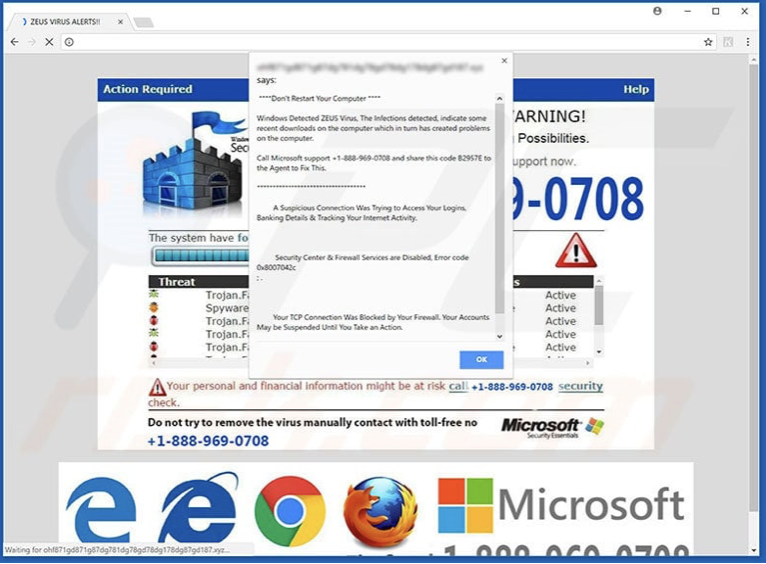
These attacks are very frustrating to users who are not familiar with the methods of resolving the issue themselves. Sadder yet, many fall for the trap into thinking this is a legitimate website and end up losing capital.
Beyond the immediate harm, these attacks are often the first step in large cybercriminal scams. Their success contributes to an ever-increasing global cybercrime cost, estimated to reach $10.5T annually by 2025, a 33% increase from 2024.
Detection & Investigation
Detecting browser hijack attacks in real time is difficult because they usually don’t involve malware, file downloads, or system-level changes. You often only learn about them when the victim places a support call.
While many managed service providers, including Celera IT, implement web-filtering policies to block known malicious domains, it remains a cat-and-mouse game.
Attacker infrastructure rotates constantly, and new fraudulent domains can remain active for days before being detected.
These hijacks all share one defining feature:
They trap the user in full-screen mode. Removing the visible ‘close’ buttons and preventing escape.
This observation raised a question:
Could we disable full-screen mode at the browser policy level to eliminate the attacker’s primary tactic?
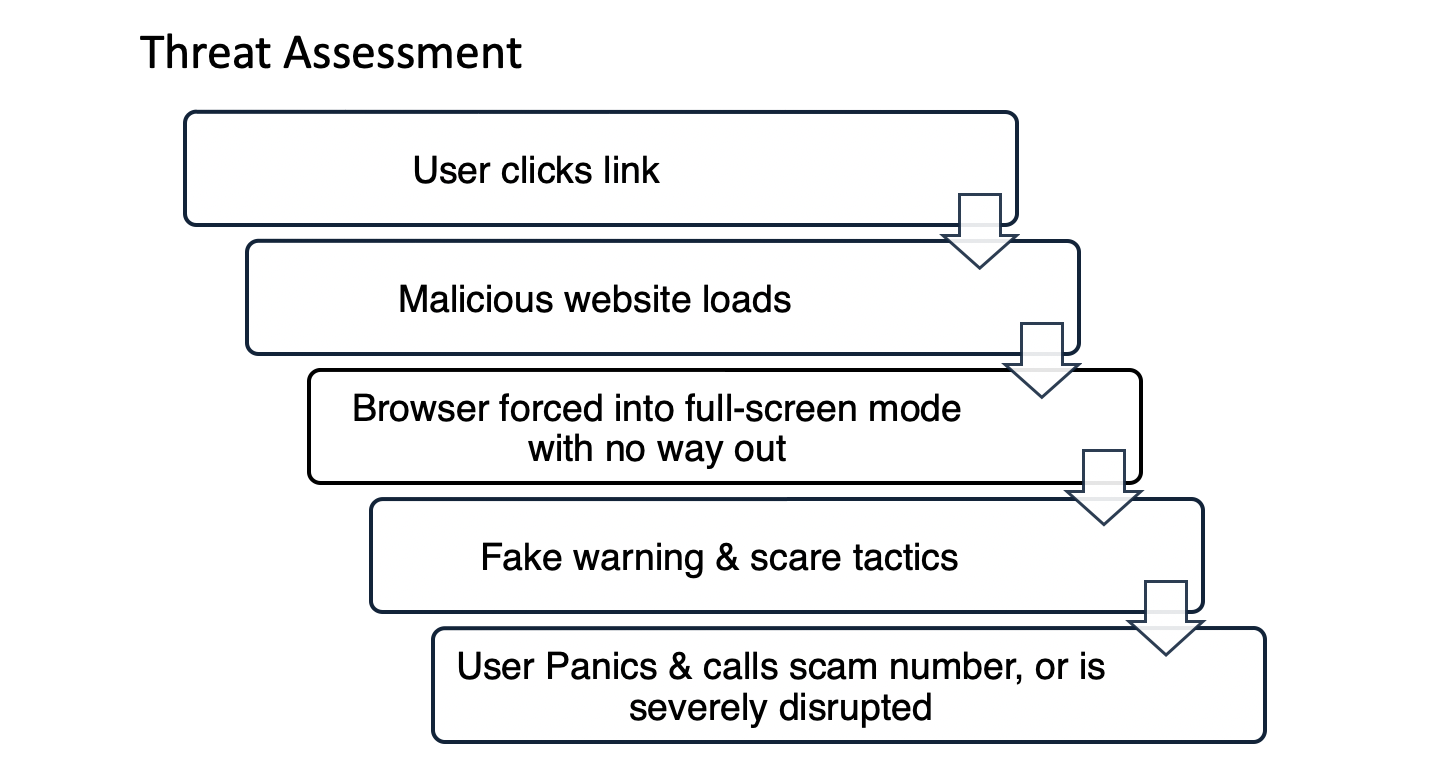
Analysis of attack revealed common patterns:
- The malicious site forces the browser into full-screen mode.
- Keyboard shortcuts like Alt+F4 or Esc are disabled.
- The browser becomes unresponsive.
- Users who recognize the scam are disrupted until IT can remediate.
This made the threat less about sophisticated exploitation, and more about fear, and urgency.
Mitigation Strategy and Actions Taken
All modern browsers allow administrators to create policies which can enable or disable features.
The key setting identified: Disable the browser’s ability to enter full-screen mode entirely.
Steps taken:
- Deploy the policy globally to all managed endpoints via M365 admin.
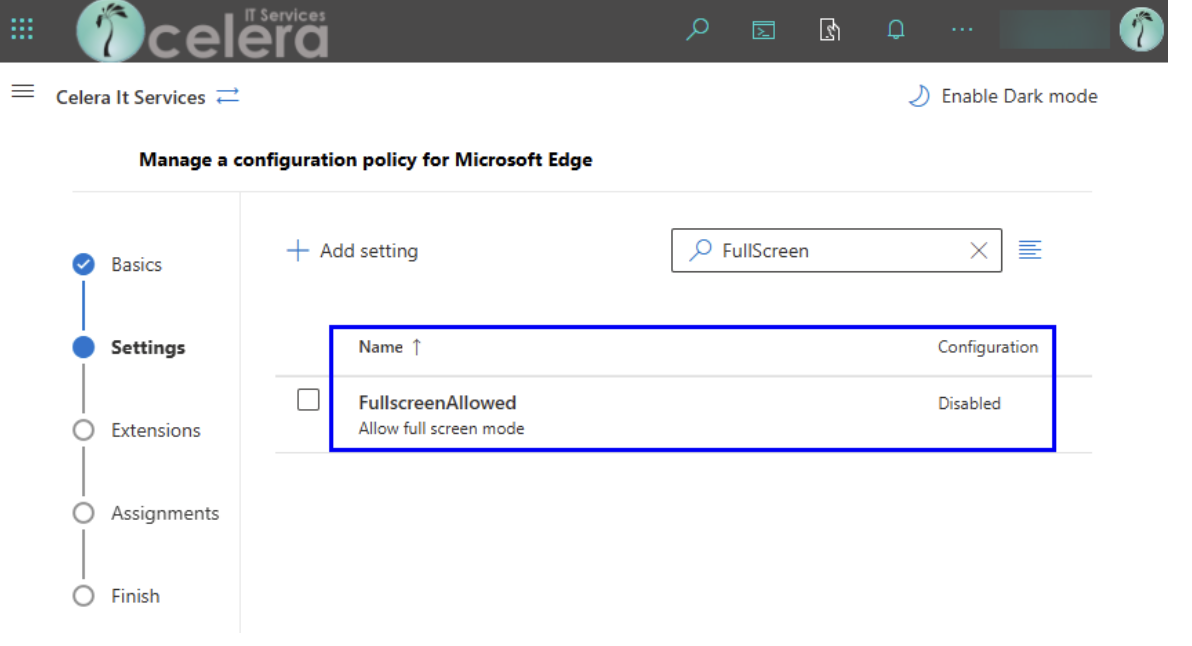
2. Deploy a Powershell script to all computers not managed by M365.

3. Test the behavior and verify browser cannot enter full screen mode.
When the policy is active:
- Websites can no longer force full-screen mode.
- Hijack pages no longer “trap” the user, breaking the attacker’s playbook.
This drastically reduced the impact of scam pages, even if a user still clicked on one.
Outcome And Results
The results were immediate and measurable:
- Support tickets for browser hijacks vanished.
- Users who encountered attacks were able to simply close the tab.
Most importantly, the organization reduced risk exposure without deploying new tools, spending money, or adding overhead.
Lessons Learned
Not all security problems require complex solutions.
- A single policy change outperformed multiple security layers.
Website filtering alone is not enough.
- Malicious websites constantly change, making domain-based blocking incomplete.
User experience matters.
- Reducing panic and confusion is as important as preventing compromise.
Browser policies are a powerful yet underutilized security tool.
- Consistent hardening settings across all endpoints eliminate entire categories of social engineering attacks.
Conclusion
Browser hijack attacks remain a persistent nuisance and threat from cybercriminals. By identifying a common mechanism, and disabling that capability, we were able to significantly reduce both the frequency and severity of these attacks.
A lightweight, zero-cost configuration ended up delivering one of the most effective security improvements of the year.
If your organization is experiencing similar issues, or if you want a proactive review of your cybersecurity posture, reach out to us. Celera IT Services helps businesses implement practical, cost-effective cybersecurity controls that deliver immediate results.